QuickShots Cut PreViz Time!

Watch QuickShots in StoryBoard Artist v.5!

PowerProduction has revolutionized digital storyboarding with our new QuickShots Technology!

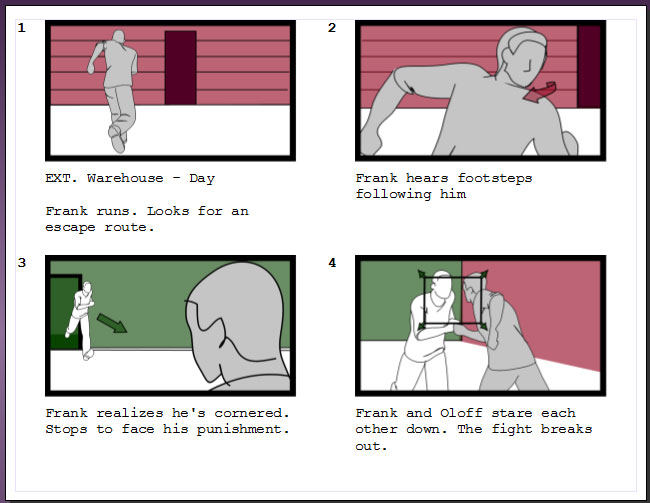
QuickShots are available in StoryBoard Quick Studio, StoryBoard Artist, and StoryBoard Artist Studio!  With this unparalleled feature, impressive storyboards are faster than ever: from the QuickShots dialog, pick a Shot Type and then simply choose the Characters and Location from our pre-loaded artwork (or import your own).  Click to generate the QuickShot and include a special automatic Slugline in your Frames’ Caption Window!

StoryBoard Quick Studio’s variety of Shot Types offers a ton of flexibility for fast-paced storyboarding, and you have even more possibilities in StoryBoard Artist where we’ve added many more Shot Types to choose from!  Combined with advanced StoryBoard Artist animatic creation tools and object effects, your storyboards are primed and ready for great detail and presentation power.

Watch the video to see the shot-generating pre-viz power of QuickShots demonstrated in StoryBoard Artist v.5′s interface!

Announcing StoryBoard Quick v6.1 !

StoryBoard Quick v6.1  is the latest in our popular line of StoryBoard Quick previzualization tools!  This new version emphasizes portability and functionality with iPhone and iPad compatibility and updated features!

If you already own Quick v6, upgrade your storyboarding software to StoryBoard Quick v6.1 today.

StoryBoard Quick v6.1 now imports projects from StoryBoard Quick Direct, our newest iOS app that lets you storyboard on the go!  Download StoryBoard Quick Direct onto your iPhone, iPad, or iTouch to place storyboarding power in your pocket.  Then, upload StoryBoard Quick Direct projects to PowerProduction’s cloud and open it in your desktop copy of New StoryBoard Quick v6.1!

NEW Stand-Ins really Stand Out!

Colorizable Stand-Ins really Stand Out!

The new Stand-In Add-On Library brings classic outlined stand-in characters to your copy of StoryBoard Quick, StoryBoard Quick Studio, or StoryBoard Artist!  They’re ready to stand in for any character, bringing simple vector line-drawings into the mix to represent anyone, anywhere!

The Stand-In Man and Stand-In Woman work with imported projects from StoryBoard Quick Direct for the iPhone and iPad.  Not only will the colorizable Stand-Ins give you that super cool, hand-drawn look (without having to draw!) but they also “stand in” when you use the NEW mobile apps StoryBoard Quick Direct for iPhone and StoryBoard Quick Direct HD for iPad to create boards on the go!

The characters are represented as sketch outlines in three elevations of all of the standard StoryBoard Quick poses: Stand, Walk, Run, Jump, Sit, and Prone.  The Stand-In Add-On Library is easy to find—the Library loads as a Palette right into your copy of StoryBoard Quick, StoryBoard Quick Studio, or StoryBoard Artist!  Find them right away in the Palettes Menu under your Windows Menu and open it in the interface for quick and effortless use in your storyboard software.

StoryBoard Quick 6 Hands-On Seminar

We are excited to collaborate with Digital Juice and create a hands-on seminar on the features and functionality of StoryBoard Quick! Digital Juice contributor Kevin shows off StoryBoard Quick and explains how digital storyboarding creates great-looking storyboards, how to create storyboard with provided art, drawn objects and imported graphics, and how to share your project with cast, crew, and clients—all while showcasing its extremely easy-to-use interface!

StoryBoard Quick helps teachers engage students

Teachers from Santa Cruz County learn how to use StoryBoard Quick.

StoryBoard Quick recently presented at the second annual Digital Connections Project (or “DigiConn”) of the Santa Cruz County Office of Education!  DigiConn’s goal is to connect students and teachers with digital media and project-based learning, and we at PowerProduction Software were excited to share our software StoryBoard Quick and to head some great hands-on projects!

Our CTO Paul Clatworthy visited the coastal city to talk to 50 teachers about using video in their classrooms to engage students. 

StoryBoard Locations for Quick and Artist!

In with the new year, and in with new content!  This week, we’ve launched StoryBoard Locations by PowerProduction Software!  This is just one more step towards our goal to always provide new, exciting content for your storyboards.

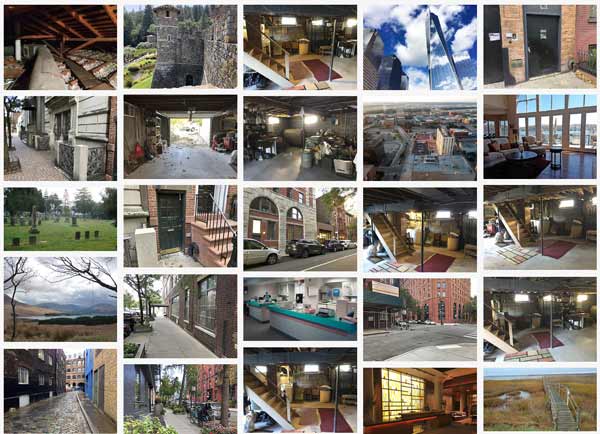
StoryBoard Locations now provides unpopulated photographs of Exteriors and Interiors for use as backgrounds and location shots in StoryBoard Quick and StoryBoard Artist for even easier storyboarding!  From interiors to exteriors, airports to oceans, London to the South Pacific, you can find great background images here!

Artist is Downloadable!

Shipping can cost you precious time and money, so we’ve released a new downloadable version of StoryBoard Artist 5 and StoryBoard Artist Studio 5!

Download StoryBoard Artist 5 TODAY!

Downloading is FREE and instant, allowing you to get this powerful storyboarding software ASAP so you can finish your pre-production and hit the set faster than ever!

Now you can impress your crew and clients with clear, great-looking storyboards TODAY with a download of StoryBoard Artist or Artist Studio.  Just click the “Download” option in the cart to receive instant access to download links and your serial number!

Chat with us now and we can tell you more about downloading StoryBoard Artist 5 or StoryBoard Artist Studio 5!

StoryBoard Quick: Top Gift for Filmmakers!

Celebrate FilmmakersWe made the list!

Don’t forget the filmmaker on your list..you!

We’re honored to be recommended for the second year in a row as a top gift for filmmakers this season!  From learning to filming to editing, FilmMakerGifts.com’s recommendations list has ideas for every stage of production.  StoryBoard Quick is featured at FilmMakerGifts.com alongside many other essential tools for the aspiring and professional filmmaker. 

iPhone & iPad App Unveiled!

StoryBoard Artist Shot Assistant takes your StoryBoard Artist project on tour!  Now you can view your storyboards on-the-go with Artist’s new App for iPhone and iPad!

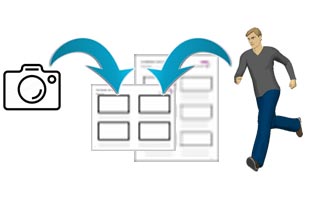
Export your StoryBoard Artist v5 projects to Shot Assistant to accompany you on set to complete the perfect cinematic shot and share information with your crew using your iPad or iPhone .

Scroll through all of your storyboards frame by frame, view your text/script captions, mark your completed shots with a “check,” playback your project as an animatic, or email the project for sharing on iPhone, iPad or iTouch.

StoryBoard Artist Shot Assistant will keep you organized and on-track while in production!

Martini QuickShot for FCP X!

New Post-Production Visualization Plug-in version available for Final Cut Pro X!

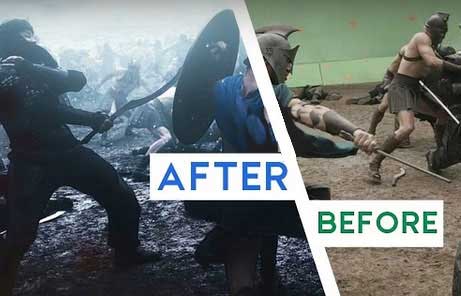
Los Gatos, CANovember 9, 2011 – Quickly following the release of Apple’s Final Cut Pro X, PowerProduction Software announced the release of a new version of the popular post-visualization plug-in for FCP. Martini QuickShot 2 is the sequel of the first plug-in for post-production visualization that makes it easy for editors to direct additional shots and sequences.  With Martini 2′s dynamic power, editors no longer need to use black slugs with text explaining what “shot goes here”—and now this power is available for Final Cut Pro X.


Subscribe to RSS Feed Follow me on Twitter!